 ruityNest
The Custom FL Studio Upgrade
Save Time.
Make More Music.
Organize Your Musical Ideas Visually with FruityNest.
Build a custom plugin panel. Load tools instantly. Save complete sound chains.
FruityNest
FruityNest
- ×Hundreds of forgotten FL Studio presets
- ×Great ideas buried in old projects
- ×Rebuilding the same workflow over and over
- ×Searching instead of creating

Save instruments, FX chains, and MIDI as reusable presets.
Load them into any project instantly — or transfer them between projects. Everything connected automatically.
Can't remember where that awesome sample from yesterday was?
Yeah, me neither.
Don't waste time trying to remember where it was — save it to your preset manager, give it a meaningful label, and return to it in one click.
Find Anything Instantly.
Search your entire library by keywords, tags, and custom associations. Never waste time scrolling — type and find.

Remember Why It Worked
Save notes directly inside your workflow. Store preset combinations, ideas and discoveries — then find them again in one click.
Hear It First.
Listen to any preset or sample before loading it into your project. No surprises, no wasted clicks.
Every Piano Roll script, one key away.
Press Q in the Piano Roll and your scripts open as tiles. Click one or drag it onto your notes and it runs. Sort them into categories, search across all of them, and bring in the scripts that come with FL Studio.
Move finished parts from project to project.
Select clips in any project and save them as a preset, with notes and an audio preview. Search through all your projects, then drag the part straight into FL Studio. Instruments, mixer tracks and automation come with it.
Your Tools, Your Way.
Pin your favorite plugins, presets, and instruments to a custom panel. Everything you use is always within reach.
Access your tools instantly.
Your panel is always in front of you — no more searching through menus or breaking your creative flow.
Drag any plugin or preset anywhere in FL Studio. One click, no hassle.
Too many delays or compressors added?
Create your own tag panel and get exactly what you need in one click — no scrolling, no guessing.
No more guessing plugin names.
Name your tools whatever makes sense to you.
Never Get Lost in Your Playlist.
See all your tracks in miniature. Mute, solo, and navigate between tracks without endless scrolling. Everything is visible, everything is one click away.
No more searching for plugins in the Channel Rack.
Open the plugin or tweak the mixer FX for the selected pattern instantly.
Dynamic EQ for every track.
EQ panel updates automatically based on your selected track. Adjust your mix without leaving the playlist.
Work with only the tracks that matter.
Mark your active tracks and jump between them in one click. Stay focused on what you're editing without endless scrolling.
Test Different Mixes in Seconds.
Save snapshots of your mute/solo arrangement. Switch between arrangements instantly — ideal for mixing and live performance.
An AI that works on your patterns.
Click patterns in FL Studio and ask in plain words: a new rhythm, a bass line for these chords, a variation of a melody. Nest AI reads the notes from your project, shows you a plan and writes it into FL when you press Implement. Write your own rules to tell it which patterns to work with and how you like things done.
Auto Group Creation, Keep Routing
Turn selected tracks into a new mixer group. Your routing stays exactly as it was. Perfect for stem buses and shared EQ chains.
Test different mix settings in seconds.
Save mixer snapshots with all track and FX settings. Switch between versions instantly — ideal for comparing mix approaches.
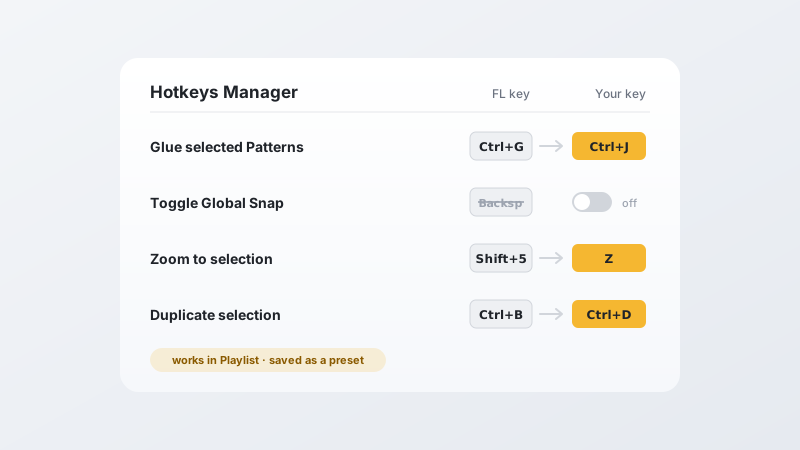
Your shortcuts. Your rules.
Rebind any FL Studio shortcut, switch off the ones that get in your way and add up to three keys of your own to every action — per window, so Playlist and Piano Roll never fight over a key. Switching from another DAW? Keep the muscle memory you already have and let FL Studio adapt to you. Save your setup as a preset and take it anywhere.
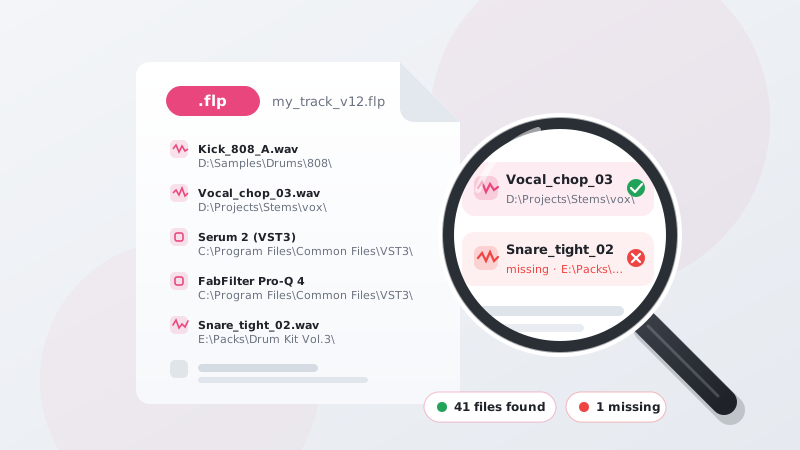
Know exactly what your project uses.
Scan any .flp to instantly see every sample, audio file and plugin used in the project, along with their exact file paths. Know exactly what your project uses and where every file is located.
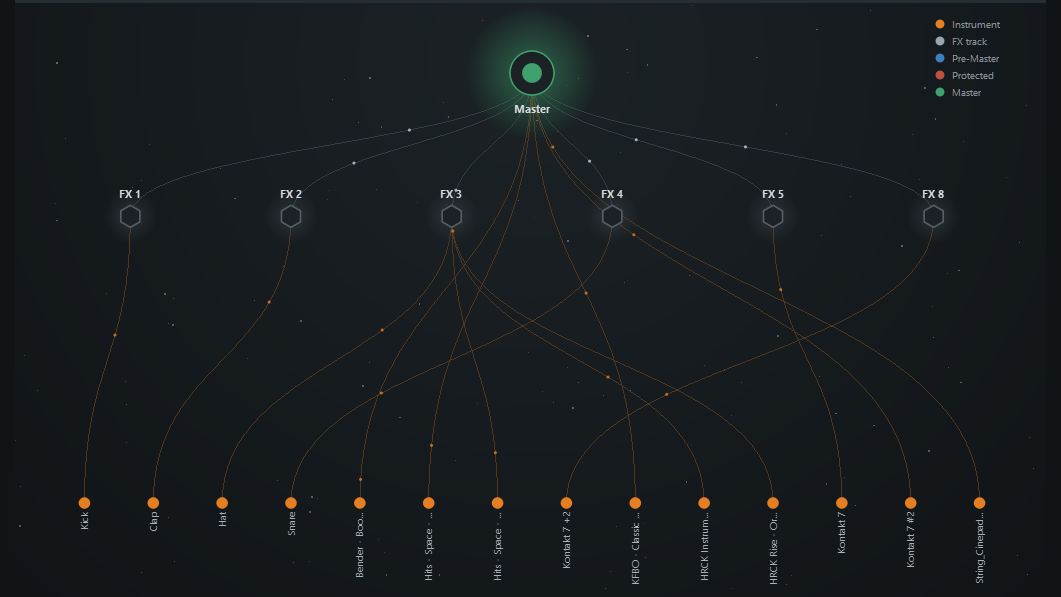
See your entire project from a bird's-eye view.
Project Universe maps your whole project onto a single canvas — every track, pattern, sample and plugin laid out around it. Zoom out to grasp the full picture at a glance, then dive into any part in seconds.